GridinSoft Threat Intelligence
java.exe threat report
GridinSoft Anti-Malware detection
Detected by GridinSoft before you download
The current ThreatInfo record shows this exact file hash detected as Trojan.Kryptik. Download GridinSoft Anti-Malware to scan the device, confirm whether this file is present, and remove the detected object if it is found.
- Detection name
- Trojan.Kryptik
- Recommended action
- Scan and remove
- Last analysis
- 2026-05-22 06:00:14 (5 days ago)
- File hash
- 604c2be94003d51788d6606e0ecd4068
Why it matters
Why GridinSoft flags this file
GridinSoft identifies the sample as Trojan.Kryptik, part of the Trojan threat category.
Malware disguised as legitimate software or delivered through deceptive packaging. Related Trojan reports help compare this file with nearby detections, publishers, and hashes.
First seen 2026-05-22 06:00:14 (5 days ago); latest analysis 2026-05-22 06:00:14 (5 days ago).
Company metadata: AdoptOpenJDK. Product metadata: OpenJDK Platform 16.0.1.
Signed by London Jamocha Community CIC. The signature is reported as valid, but signed files can still be bundled or abused.
ThreatInfo has seen this file in user or system paths listed below. Unexpected locations increase the need for local verification.
Recommended action
What to do next
- Compare the MD5 above with the file found on the device.
- Check whether the file appears in the observed locations or under one of the alternate names.
- Run GridinSoft Anti-Malware to confirm the detection and remove the file if it is present. Review the Trojan category for related samples and common context.
File context
java.exe is a Windows file recorded in the ThreatInfo database. It is associated with OpenJDK Platform 16.0.1. The reported company name is AdoptOpenJDK. The current detection status is Trojan.Kryptik, based on the latest analysis from 2026-05-22 06:00:14 (5 days ago). ThreatInfo groups this verdict with Trojan reports for broader family-level investigation.
If java.exe appears on your computer unexpectedly, treat it as suspicious. Check its location, digital signature, and recent system changes before allowing it to run. A full anti-malware scan is recommended when this file is detected as Trojan.Kryptik.
File Details
| Product Name: | OpenJDK Platform 16.0.1 |
| Company Name: | AdoptOpenJDK |
| MD5: | 604c2be94003d51788d6606e0ecd4068 |
| Size: | 46 KB |
| First Published: | 2026-05-22 06:00:14 (5 days ago) |
| Latest Published: | 2026-05-22 06:00:14 (5 days ago) |
| Status: | Trojan.Kryptik (on last analysis) | |
| Analysis Date: | 2026-05-22 06:00:14 (5 days ago) |
Detection screenshot
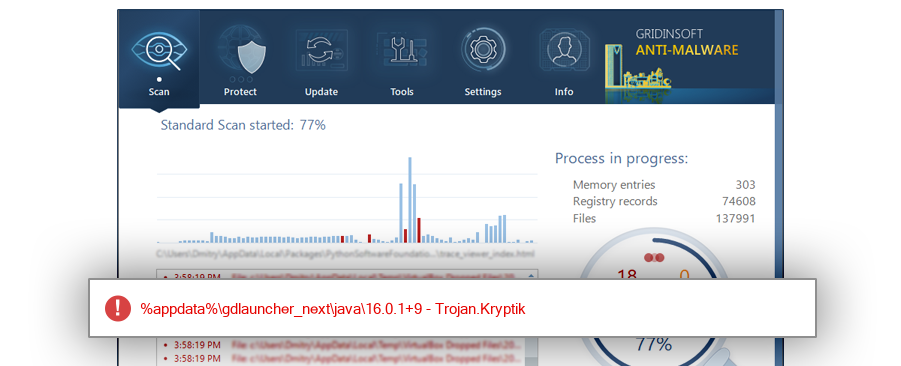
The screenshot is a visual record of a GridinSoft Anti-Malware detection for this sample. Use the hash and metadata above as the primary identifiers when comparing the file on your system.
Overview
| Signed By: | London Jamocha Community CIC |
| Status: | Valid |
The signature on java.exe is reported as valid. A valid signature helps confirm publisher identity, but it does not automatically make the file safe if the installer was bundled, abused, or downloaded from an untrusted source.
Common Places:
| %appdata%\gdlauncher_next\java\16.0.1+9 |
ThreatInfo has observed java.exe in the locations listed above. Files found in temporary folders, user profile folders, startup locations, or unusual application directories should be reviewed more carefully than files installed under a known program directory.
Geographic signal
Observed country distribution
ThreatInfo has seen java.exe across 1 countries. Use this signal to compare local evidence with where the sample is most often reported.
The strongest geographic signal for this file is Spain with 100.0% of observed hits. Geographic distribution can help identify targeted campaigns, regional software bundles, or where a file is most commonly reported.
OS Version:
The most common operating system signal for java.exe is Windows 10 with 100.0% of observed hits. If your system differs from the common profile, check whether the file was introduced by a specific installer, archive, or removable device.
Analysis
java.exe is identified as pe for 64-bit systems. The subsystem is Windows CUI. PE header values are useful for triage, especially when they do not match the expected publisher, product, or release timeline.
PE Sections:
Section layout highlights raw-size concentration, repeated names, packer markers, and hashes that can be compared across related samples.
77f559b6ee460f0625623ab11bee84e2
32b75986f249363f83aee4adaed972e8
13d38524136f62189b0c5efcd9a177ae
22c37f4cfbb829bd4a3b45d0be278ef5
9cff2d165d43d93de0ffae10a0fd1ea2
a1049843d4372c959cdfbdef49b80ea4
PE section names and hashes can reveal packing, injected resources, or unusual build artifacts. Sections with uncommon names, very large raw data, or hashes that differ from a trusted copy deserve additional review.
Report conclusion
GridinSoft detects this file as Trojan.Kryptik
This report identifies java.exe by MD5 604c2be94003d51788d6606e0ecd4068. It is part of the Trojan report group. If the same file is present on your device, scan the system and remove the detected object after confirming the hash and location.