GridinSoft Threat Intelligence

f_000272 threat report

Detected as PUP.Reimage File reputation report
MD5 20c7e0396de12d823e8b1660650ad999
Latest seen 2024-11-30 23:00:53 (a year ago)
First seen 2017-10-29 23:09:11 (8 years ago)
Size 591 KB
Publisher Reimage
Product Reimage Repair
Signed by Reimage Limited

GridinSoft Anti-Malware detection

Detected by GridinSoft before you download

The current ThreatInfo record shows this exact file hash detected as PUP.Reimage. Download GridinSoft Anti-Malware to scan the device, confirm whether this file is present, and remove the detected object if it is found.

Detection name
PUP.Reimage
Recommended action
Scan and remove
Last analysis
2024-11-30 23:00:53 (a year ago)
File hash
20c7e0396de12d823e8b1660650ad999
Download Anti-Malware

Why it matters

Why GridinSoft flags this file

Detection

GridinSoft identifies the sample as PUP.Reimage, part of the PUP threat category.

Category context

Potentially unwanted programs, bundlers, installers, and utilities with intrusive behavior. Related PUP reports help compare this file with nearby detections, publishers, and hashes.

Timeline

First seen 2017-10-29 23:09:11 (8 years ago); latest analysis 2024-11-30 23:00:53 (a year ago).

Publisher context

Company metadata: Reimage. Product metadata: Reimage Repair.

Digital signature

Signed by Reimage Limited. The signature is reported as valid, but signed files can still be bundled or abused.

Aliases

This hash has appeared under multiple file names, which can happen with repackaging, bundling, or deliberate renaming.

Observed locations

ThreatInfo has seen this file in user or system paths listed below. Unexpected locations increase the need for local verification.

Recommended action

What to do next

  1. Compare the MD5 above with the file found on the device.
  2. Check whether the file appears in the observed locations or under one of the alternate names.
  3. Run GridinSoft Anti-Malware to confirm the detection and remove the file if it is present. Review the PUP category for related samples and common context.

f_000272 is a Windows file recorded in the ThreatInfo database. It is associated with Reimage Repair. The reported company name is Reimage. The current detection status is PUP.Reimage, based on the latest analysis from 2024-11-30 23:00:53 (a year ago). ThreatInfo groups this verdict with PUP reports for broader family-level investigation.

If f_000272 appears on your computer unexpectedly, treat it as suspicious. Check its location, digital signature, and recent system changes before allowing it to run. A full anti-malware scan is recommended when this file is detected as PUP.Reimage.

Product Name: Reimage Repair
Company Name: Reimage
MD5: 20c7e0396de12d823e8b1660650ad999
Size: 591 KB
First Published: 2017-10-29 23:09:11 (8 years ago)
Latest Published: 2024-11-30 23:00:53 (a year ago)
Status: PUP.Reimage (on last analysis)
Analysis Date: 2024-11-30 23:00:53 (a year ago)
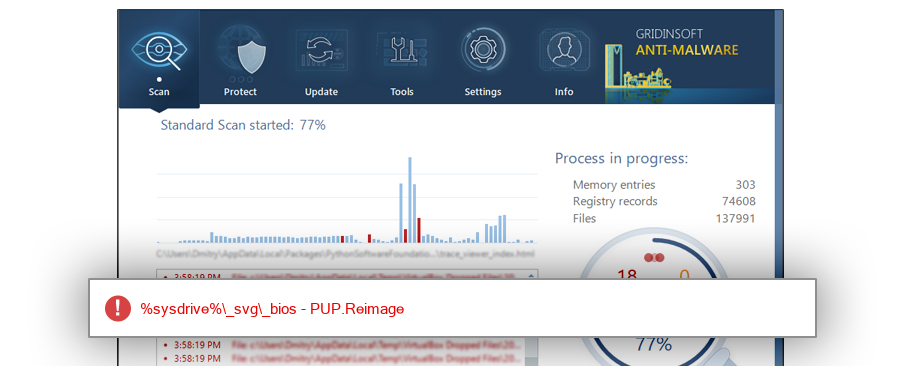
f_000272 detection screenshot

The screenshot is a visual record of a GridinSoft Anti-Malware detection for this sample. Use the hash and metadata above as the primary identifiers when comparing the file on your system.

Signed By: Reimage Limited
Status: Valid

The signature on f_000272 is reported as valid. A valid signature helps confirm publisher identity, but it does not automatically make the file safe if the installer was bundled, abused, or downloaded from an untrusted source.

%programfiles%\reimage\reimage repair
%profile%\downloads
%localappdata%\packages\microsoft.microsoftedge_8wekyb3d8bbwe\ac\#!001\microsoftedge\cache\oh2824b7
%desktop%\film enzo
%profile%\downloads\programs
%localappdata%\packages\microsoft.microsoftedge_8wekyb3d8bbwe\ac\#!001\microsoftedge\cache\ag5z0c4r
%localappdata%\packages\microsoft.microsoftedge_8wekyb3d8bbwe\ac\#!001\microsoftedge\cache\gw4kxajc
%profile%\desktop
%sysdrive%\adwcleaner\quarantine\fraqbc8wsa\reimage repair
%sysdrive%\adwcleaner\quarantine\3solbph71y

ThreatInfo has observed f_000272 in the locations listed above. Files found in temporary folders, user profile folders, startup locations, or unusual application directories should be reviewed more carefully than files installed under a known program directory.

ReimageRepair.exe ReimageRepair[1].exe ReimageRepair[2].exe ReimageRepair (1).exe ReimageRepair_2.exe ReimageRepair_3.exe $RE0UA17.exe ReimageRepair_5.exe ReimageRepair_4.exe $R9EVLK1.exe $RGOLPGZ.exe $RRBPDD0.exe ReimageRepair(1).exe $RQT18DY.exe $RRDP2B6.exe $RAEWU80.exe $RBKSWS6.exe ReimageRepair (2).exe ReimageRepair (4).exe ReimageRepair (3).exe $RM8WJPG.exe $RP04KYL.exe $R04ZNS0.exe $RCFLZWB.exe ReimageRepair32.exe $RMUJMAX.exe $RJMHDHG.exe ReimageRepair (5).exe ReimageRepair (6).exe $RC6L5KT.exe $RAWWNR7.exe $R20B1S9.exe $R3I50U8.exe $ROU276C.exe $R0EP44Q.exe $RGQWMXO.exe $RPJHFJ9.exe ReimageRepair (8).exe ReimageRepair (7).exe $RS9U3UN.exe $RG9MM62.exe ReimageRepair(2).exe ReimageRepair(3).exe $RIKO0RU.exe $RLCIK76.exe $R9DFEO0.exe $RBMOW4T.exe ReimageRepair (2017_12_25 12_15_11 UTC).exe $RVXYXNM.exe A0017987.exe A0201348.exe Dm104.exe A0194904.exe A0214843.exe $RJKL91G.exe ReimageRepair (12).exe ReimageRepair (16).exe ReimageRepair (14).exe ReimageRepair (11).exe ReimageRepair (15).exe ReimageRepair (10).exe ReimageRepair (13).exe ReimageRepair (9).exe $R8E41YS.exe $RF2CEQ9.exe $RYLRJY8.exe A0203234.exe A0203253.exe $ROCVQET.exe $RF5OUFC.exe $RV4URV9.exe $RSLSFTB.exe $RI1SJLT.exe $RGNKGVT.exe $R6VVS1W.exe ReimageRepair (2017_12_20 22_49_43 UTC).exe ReimageRepair (2017_11_29 11_22_06 UTC).exe ReimageRepair (2017_12_04 19_29_35 UTC).exe $RWEOEV5.exe $RBRPGK3.exe $R5QFU92.exe ReimageRepair (1) (2017_11_20 22_46_18 UTC).exe ReimageRepair (2017_11_20 22_46_18 UTC).exe $R0Q5MD1.exe $RJAP9P0.exe ReimageRepair (2017_11_22 11_05_03 UTC).exe $ROS5GZ3.exe ReimageRepair(4).exe $RYJA3NM.exe Niepotwierdzony 927161.crdownload $RFOSJI8.exe $R83QZH2.exe $R4EVS2O.exe A0569445.exe $R8HKJAC.exe ReimageRepair (2018_01_22 02_11_58 UTC).exe $R2V6QO9.exe $R43QM24.exe $RDY0UD9.exe $R43SO7M.exe $R8ENM1E.exe $RUPBJ5W.exe $RDNXWNN.exe $RXIB2ZP.exe ReimageRepair_2 (2018_01_30 20_12_03 UTC).exe ReimageRepair (2018_01_30 20_12_03 UTC).exe $RJA1Y1M.exe $RPZVPCR.exe $RGGLG3P.exe ReimageRepair (2017_12_13 17_52_05 UTC).exe $R7R5DF1.exe A0158069.exe A0129842.exe ReimageRepair(5).exe ReimageRepair(6).exe A0007516.exe A0163927.exe $R8PVOZM.exe ReimageRepair (2017_11_27 04_20_03 UTC).exe ReimageRepair (1) (2017_11_27 04_20_03 UTC).exe $R06MG6J.exe $RXG0F7Q.exe $RHNUSQD.exe $RZ5MGWJ.exe $R0H9A7Y.exe $RR0OVHR.exe ._cache_ReimageRepair.exe ReimageRepair (2018_02_19 05_56_27 UTC).exe $RRGD8M1.exe $RNV04QH.exe $RZD6A9I.exe $RU5ENNS.exe $RWIWH4T.exe A0474235.exe A0474233.exe A0474234.exe $RFEUQ6I.exe $RJIJB5P.exe $R5O5GN7.exe $R518J3F.exe $R18J253.exe $R4CY7HC.exe ReimageRepair (2018_03_05 12_46_56 UTC).exe f_005f00 f_005eff $RYLNW06.exe $R6JZ54I.exe $RJNZTWJ.exe $RUGKXQD.exe $RHJ6LAV.exe $RZ4YJGU.exe $RC7G86D.exe $RQ1QBV0.exe $RGBRUY9.exe $RQOMUIS.exe ReimageRepair (2018_02_03 20_37_13 UTC).exe $R4747I0.exe $RZYMDR2.exe Unconfirmed 60958.crdownload $RYPLOVG.exe ReimageRepair[3].exe f_0039d3 $RVD9LNG.exe ReimageRepair (2018_01_14 12_58_18 UTC).exe $RVS5HBZ.exe ReimageRepair (2018_01_15 06_33_45 UTC).exe f_000050 $RRKW1FK.exe $RIB8C6B.exe $RGM96D0.exe $RGVNUOY.exe _ReimageRepair.exe $RL6TORU.exe $RJLB7RR.exe $RHVAVJK.exe $RKCSW0S.exe $RJ1E9M4.exe $RC9IRQ5.exe $RL9LEGM.exe A0148157.exe $RQ3IWMD.exe $RTRHSRV.exe $R2YEUI5.exe $R8V0AYV.exe $R0DQFSG.exe $RP2N4MT.exe $RAFXRUF.exe $RV2EL8G.exe ReimageRepair (2018_04_20 08_26_47 UTC).exe ReimageRepair(1) (2018_04_20 08_26_47 UTC).exe $RIV8VLK.exe A0014151.exe A0014383.exe A0014146.exe A0014147.exe A0014155.exe A0014156.exe A0014149.exe A0014152.exe A0014145.exe A0014153.exe A0014154.exe A0014148.exe ReimageRepair (17).exe ReimageRepair (18).exe ReimageRepair(10).exe ReimageRepair(7).exe ReimageRepair(9).exe ReimageRepair (20).exe ReimageRepair(13).exe ReimageRepair (19).exe ReimageRepair(14).exe ReimageRepair(11).exe ReimageRepair(12).exe ReimageRepair(8).exe A0346330.exe $RUTD0KC.exe $RIXHNLY.exe ReimageRepair(3) (2018_01_30 20_51_13 UTC).exe ReimageRepair(1) (2017_11_28 19_57_54 UTC).exe ReimageRepair(2) (2018_01_30 03_12_15 UTC).exe ReimageRepair (2018_03_14 04_44_22 UTC).exe Dc38.exe $R0LVUQG.exe $RXNYGUD.exe $R37H8HO.exe A0044344.exe $RA7XUFR.exe Dc27.exe A0326004.exe $RJ7KFS8.exe Reimage Repair 02.exe Reimage Repair 01.exe A0689868.exe $R072VEY.exe $RSQFO9Z.exe $R3JMJM7.exe $RGCF8S9.exe $RXWVVMV.exe ReimageRepair.exe.ejv6csg.partial $RET108J.exe $RGAVXED.exe Unconfirmed 491832.crdownload $RWWNBLN.exe $RQGRBTV.exe A0004352.exe $R6ZFNEJ.exe $RF3LPP8.exe $RBO5D6N.exe ReimageRepair (2018_02_22 09_19_31 UTC).exe $RJLFC61.exe $REOGZGY.exe ReimageRepair2.exe $RN7P97N.exe $RT1K9BV.exe $RBIOF0G.exe $RECQHFY.exe $RZZ4WSD.exe $RC8L4S7.exe skype.exe $RP5QOZE.exe $R68325G.exe ReimageRepair.exe.92f1ais.partial $RP3QDDX.exe ReimageRepair.exe.y8sqe8h.partial ReimageRepair.exe.xentvbb.partial ReimageRepair.exe.eyr95dn.partial ReimageRepair (2).exe.h3p18mk.partial $ROHLJ7P.exe $RWAIT37.exe ReimageRepair (1) (2018_01_31 04_14_27 UTC).exe ReimageRepair (1) (2018_02_06 03_20_38 UTC).exe ReimageRepair (2018_01_31 04_14_27 UTC).exe ReimageRepair (1) (2018_02_02 16_44_50 UTC).exe ReimageRepair (2018_02_06 03_20_38 UTC).exe ReimageRepair (2018_02_02 16_44_50 UTC).exe A0207485.exe ReimageRepair (2018_04_29 07_53_59 UTC).exe $R0HN1OK.exe $R6EF400.exe ReimageRepair (21).exe ReimageRepair (27).exe ReimageRepair (37).exe ReimageRepair (36).exe ReimageRepair (32).exe ReimageRepair (30).exe ReimageRepair (38).exe ReimageRepair (28).exe ReimageRepair (41).exe ReimageRepair (43).exe ReimageRepair (35).exe ReimageRepair (23).exe ReimageRepair (25).exe ReimageRepair (33).exe ReimageRepair (44).exe ReimageRepair (39).exe ReimageRepair (40).exe ReimageRepair (24).exe ReimageRepair (22).exe ReimageRepair (26).exe ReimageRepair (29).exe ReimageRepair (31).exe ReimageRepair (34).exe ReimageRepair (42).exe Reimage Repair.exe $RTSLH8O.exe ReimageRepair (2018_07_11 06_11_40 UTC).exe $RTY14J2.exe Has PUP ShareW Reimage 1.9.0.2.exe $RD625S2.exe $R8VMTHK.exe $R2SH31X.exe $RMBM4ER.exe $R3DMYAM.exe $R9S7ETZ.exe $RLY8RGJ.exe $ROISS6Y.exe $R08LM9G.exe autodetectutility.exe $RL5ZQ6T.exe ReimageRepair-repara PC.exe $RR6LGKU.exe $RCNZTRP.exe $RUJCMGV.exe $RS3LFVC.exe $RZDS02K.exe ReimageRepair (2018_06_29 15_28_43 UTC).exe $RLEPPDT.exe $RPXZS9U.exe ReimageRepair (2018_08_08 00_31_29 UTC).exe ReimageRepair (2018_08_05 03_41_00 UTC).exe $RG51OAT.exe $R8CZTNF.exe $RIJVI37.exe $R0HQH6S.exe $RSUND2M.exe $RER2N8V.exe $R6YOSZE.exe ReimageRepair.exe.ihox66r.partial ReimageRepair.exe.36plnxy.partial gReimageRepair.exe $RZL4SLG.exe $RTJVW56.exe ReimageRepair.exe#FB4B934618ACC0B6 $RLJTMEX.exe $R0LOC5A.exe ReimageRepair.exe.a7d5wxz.partial f_00154c $RUT6LVG.exe avg_antivirus_free_setup_s2i.exe $RLJWQF4.exe ReimageRepair.exe.737iv96.partial ReimageRepair virus photo.scr.exe $RFVM3YC.exe A0012555.exe A0015764.exe $RP547Y7.exe $R3D03Z3.exe ReimageRepair.exe.vir A0064145.exe $RT101NB.exe $RBWBAYR.exe $RZKC8AD.exe $R1IQ81P.exe ReimageRepair.exe.mulmods.partial $RSV7ZC3.exe $RY8KTRL.exe $RWJQP7X.exe $RYTP0R0.exe $RINCXO6.exe $RBJVOMU.exe $RS0OL3C.exe $RUHJGP4.exe $R551HL0.exe $REMO8H5.exe $RZ3TS8Z.exe $R644KCO.exe $RJSW8BH.exe $R1R44OP.exe $RDN0YZX.exe ReimageRepair.exe.e85exka.partial $RBAH2UC.exe $RL9NSUJ.exe $R8KVVZA.exe $R4UIYUU.exe $RGWKEC1.exe ReimageRepair (2018_01_11 17_23_13 UTC).exe $RFN7JFX.exe $RJ6B15E.exe $RQ2HI38.exe $RZRAGQ2.exe Optava-w-7-8-10.exe $R0V917M.exe MXD14AE.tmp f_000274 f_000273 f_000272

This hash has been seen with multiple file names. Alternate names can appear when software is updated, copied between folders, packed by an installer, or deliberately renamed to avoid recognition. Compare the exact MD5 above before assuming two names refer to the same file.

Windows 10 63.3%
Windows 7 27.4%
Windows 8.1 5.8%
Windows XP 1.5%
Windows 8 0.9%
Windows Vista 0.5%
Windows Server 2012 R2 0.2%
Windows Server 2008 R2 0.1%
Windows Server 2016 0.1%

The most common operating system signal for f_000272 is Windows 10 with 63.3% of observed hits. If your system differs from the common profile, check whether the file was introduced by a specific installer, archive, or removable device.

f_000272 is identified as pe for 32-bit systems. The subsystem is Windows GUI. PE header values are useful for triage, especially when they do not match the expected publisher, product, or release timeline.

Format pe
Architecture 32-bit
Subsystem Windows GUI
Entry point 0x000039e3
Image base 0x00400000

PE Sections:

Sections 6
Raw data 72192

Section layout highlights raw-size concentration, repeated names, packer markers, and hashes that can be compared across related samples.

.text 28672 bytes · 39.7% of section data
MD5 f569e353af0ed51bf4c216faa9bed4e7
.rdata 11264 bytes · 15.6% of section data
MD5 91eee43954e068e650f7b73a8b0e6915
.data 512 bytes · 0.7% of section data
MD5 db9f7acbf1c3ddfe255077b699955dfa
.ndata 0 bytes · 0.0% of section data
Uncommon name
MD5 00000000000000000000000000000000
.rsrc 27648 bytes · 38.3% of section data
MD5 1b2460ce1376f59b1aab73f464c5100d
.reloc 4096 bytes · 5.7% of section data
MD5 b0c639c0ead6692630a3f20353ddb2ba

PE section names and hashes can reveal packing, injected resources, or unusual build artifacts. Sections with uncommon names, very large raw data, or hashes that differ from a trusted copy deserve additional review.

Report conclusion

GridinSoft detects this file as PUP.Reimage

This report identifies f_000272 by MD5 20c7e0396de12d823e8b1660650ad999. It is part of the PUP report group. If the same file is present on your device, scan the system and remove the detected object after confirming the hash and location.
Download GridinSoft Anti-Malware Scan the device and confirm whether this exact hash is present. Check this hash on VirusTotal

Recommended next steps

  • Compare the local file MD5 with 20c7e0396de12d823e8b1660650ad999.
  • Check the file path, publisher, and signature against the details in this report.
  • Run a GridinSoft scan and remove the object if the same hash is found. Use the PUP category to compare similar reports.