f_000272 threat report

MD5 20c7e0396de12d823e8b1660650ad999
Latest seen 2024-11-30 23:00:53 (a year ago)
First seen 2017-10-29 23:09:11 (8 years ago)
Size 591 KB
Publisher Reimage
Product Reimage Repair
Signed by Reimage Limited

GridinSoft Anti-Malware detection

Detected by GridinSoft before you download

The current ThreatInfo record shows this exact file hash detected as PUP.Reimage. Download GridinSoft Anti-Malware to scan the device, confirm whether this file is present, and remove the detected object if it is found.

Detection name
PUP.Reimage
Recommended action
Scan and remove
Last analysis
2024-11-30 23:00:53 (a year ago)
File hash
20c7e0396de12d823e8b1660650ad999
Download Anti-Malware

Why it matters

Why GridinSoft flags this file

Detection

GridinSoft identifies the sample as PUP.Reimage.

Timeline

First seen 2017-10-29 23:09:11 (8 years ago); latest analysis 2024-11-30 23:00:53 (a year ago).

Publisher context

Company metadata: Reimage. Product metadata: Reimage Repair.

Digital signature

Signed by Reimage Limited. The signature is reported as valid, but signed files can still be bundled or abused.

Aliases

This hash has appeared under multiple file names, which can happen with repackaging, bundling, or deliberate renaming.

Observed locations

ThreatInfo has seen this file in user or system paths listed below. Unexpected locations increase the need for local verification.

Recommended action

What to do next

  1. Compare the MD5 above with the file found on the device.
  2. Check whether the file appears in the observed locations or under one of the alternate names.
  3. Run GridinSoft Anti-Malware to confirm the detection and remove the file if it is present.

f_000272 is a Windows file recorded in the ThreatInfo database. It is associated with Reimage Repair. The reported company name is Reimage. The current detection status is PUP.Reimage, based on the latest analysis from 2024-11-30 23:00:53 (a year ago).

If f_000272 appears on your computer unexpectedly, treat it as suspicious. Check its location, digital signature, and recent system changes before allowing it to run. A full anti-malware scan is recommended when this file is detected as PUP.Reimage.

Product Name: Reimage Repair
Company Name: Reimage
MD5: 20c7e0396de12d823e8b1660650ad999
Size: 591 KB
First Published: 2017-10-29 23:09:11 (8 years ago)
Latest Published: 2024-11-30 23:00:53 (a year ago)
Status: PUP.Reimage (on last analysis)
Analysis Date: 2024-11-30 23:00:53 (a year ago)
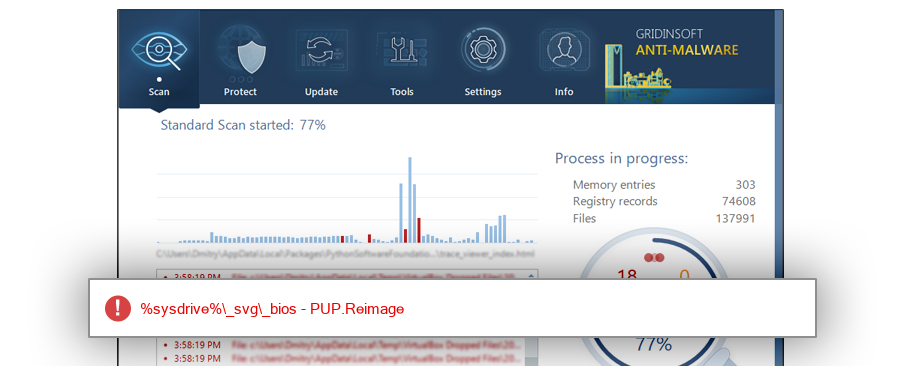
f_000272 detection screenshot

The screenshot is a visual record of a GridinSoft Anti-Malware detection for this sample. Use the hash and metadata above as the primary identifiers when comparing the file on your system.

Signed By: Reimage Limited
Status: Valid

The signature on f_000272 is reported as valid. A valid signature helps confirm publisher identity, but it does not automatically make the file safe if the installer was bundled, abused, or downloaded from an untrusted source.

%programfiles%\reimage\reimage repair
%profile%\downloads
%localappdata%\packages\microsoft.microsoftedge_8wekyb3d8bbwe\ac\#!001\microsoftedge\cache\oh2824b7
%desktop%\film enzo
%profile%\downloads\programs
%localappdata%\packages\microsoft.microsoftedge_8wekyb3d8bbwe\ac\#!001\microsoftedge\cache\ag5z0c4r
%localappdata%\packages\microsoft.microsoftedge_8wekyb3d8bbwe\ac\#!001\microsoftedge\cache\gw4kxajc
%profile%\desktop
%sysdrive%\adwcleaner\quarantine\fraqbc8wsa\reimage repair
%sysdrive%\adwcleaner\quarantine\3solbph71y

ThreatInfo has observed f_000272 in the locations listed above. Files found in temporary folders, user profile folders, startup locations, or unusual application directories should be reviewed more carefully than files installed under a known program directory.

ReimageRepair.exe
ReimageRepair[1].exe
ReimageRepair[2].exe
ReimageRepair (1).exe
ReimageRepair_2.exe
ReimageRepair_3.exe
$RE0UA17.exe
ReimageRepair_5.exe
ReimageRepair_4.exe
$R9EVLK1.exe
$RGOLPGZ.exe
$RRBPDD0.exe
ReimageRepair(1).exe
$RQT18DY.exe
$RRDP2B6.exe
$RAEWU80.exe
$RBKSWS6.exe
ReimageRepair (2).exe
ReimageRepair (4).exe
ReimageRepair (3).exe
$RM8WJPG.exe
$RP04KYL.exe
$R04ZNS0.exe
$RCFLZWB.exe
ReimageRepair32.exe
$RMUJMAX.exe
$RJMHDHG.exe
ReimageRepair (5).exe
ReimageRepair (6).exe
$RC6L5KT.exe
$RAWWNR7.exe
$R20B1S9.exe
$R3I50U8.exe
$ROU276C.exe
$R0EP44Q.exe
$RGQWMXO.exe
$RPJHFJ9.exe
ReimageRepair (8).exe
ReimageRepair (7).exe
$RS9U3UN.exe
$RG9MM62.exe
ReimageRepair(2).exe
ReimageRepair(3).exe
$RIKO0RU.exe
$RLCIK76.exe
$R9DFEO0.exe
$RBMOW4T.exe
ReimageRepair (2017_12_25 12_15_11 UTC).exe
$RVXYXNM.exe
A0017987.exe
A0201348.exe
Dm104.exe
A0194904.exe
A0214843.exe
$RJKL91G.exe
ReimageRepair (12).exe
ReimageRepair (16).exe
ReimageRepair (14).exe
ReimageRepair (11).exe
ReimageRepair (15).exe
ReimageRepair (10).exe
ReimageRepair (13).exe
ReimageRepair (9).exe
$R8E41YS.exe
$RF2CEQ9.exe
reimagerepair.exe
$RYLRJY8.exe
A0203234.exe
A0203253.exe
$ROCVQET.exe
$RF5OUFC.exe
$RV4URV9.exe
$RSLSFTB.exe
$RI1SJLT.exe
$RGNKGVT.exe
$R6VVS1W.exe
ReimageRepair (2017_12_20 22_49_43 UTC).exe
ReimageRepair (2017_11_29 11_22_06 UTC).exe
ReimageRepair (2017_12_04 19_29_35 UTC).exe
$RWEOEV5.exe
$RBRPGK3.exe
$R5QFU92.exe
ReimageRepair (1) (2017_11_20 22_46_18 UTC).exe
ReimageRepair (2017_11_20 22_46_18 UTC).exe
$R0Q5MD1.exe
$RJAP9P0.exe
ReimageRepair (2017_11_22 11_05_03 UTC).exe
$ROS5GZ3.exe
ReimageRepair(4).exe
$RYJA3NM.exe
Niepotwierdzony 927161.crdownload
$RFOSJI8.exe
$R83QZH2.exe
$R4EVS2O.exe
A0569445.exe
$R8HKJAC.exe
ReimageRepair (2018_01_22 02_11_58 UTC).exe
$R2V6QO9.exe
$R43QM24.exe
$RDY0UD9.exe
$R43SO7M.exe
$R8ENM1E.exe
$RUPBJ5W.exe
$RDNXWNN.exe
$RXIB2ZP.exe
ReimageRepair_2 (2018_01_30 20_12_03 UTC).exe
ReimageRepair (2018_01_30 20_12_03 UTC).exe
$RJA1Y1M.exe
$RPZVPCR.exe
$RGGLG3P.exe
ReimageRepair (2017_12_13 17_52_05 UTC).exe
$R7R5DF1.exe
A0158069.exe
A0129842.exe
ReimageRepair(5).exe
ReimageRepair(6).exe
A0007516.exe
A0163927.exe
$R8PVOZM.exe
ReimageRepair (2017_11_27 04_20_03 UTC).exe
ReimageRepair (1) (2017_11_27 04_20_03 UTC).exe
$R06MG6J.exe
$RXG0F7Q.exe
$RHNUSQD.exe
$RZ5MGWJ.exe
$R0H9A7Y.exe
$RR0OVHR.exe
._cache_ReimageRepair.exe
ReimageRepair (2018_02_19 05_56_27 UTC).exe
$RRGD8M1.exe
$RNV04QH.exe
$RZD6A9I.exe
$RU5ENNS.exe
$RWIWH4T.exe
A0474235.exe
A0474233.exe
A0474234.exe
$RFEUQ6I.exe
$RJIJB5P.exe
$R5O5GN7.exe
$R518J3F.exe
$R18J253.exe
$R4CY7HC.exe
ReimageRepair (2018_03_05 12_46_56 UTC).exe
f_005f00
f_005eff
$RYLNW06.exe
$R6JZ54I.exe
$RJNZTWJ.exe
$RUGKXQD.exe
$RHJ6LAV.exe
$RZ4YJGU.exe
$RC7G86D.exe
$RQ1QBV0.exe
$RGBRUY9.exe
$RQOMUIS.exe
ReimageRepair (2018_02_03 20_37_13 UTC).exe
$R4747I0.exe
$RZYMDR2.exe
Unconfirmed 60958.crdownload
$RYPLOVG.exe
ReimageRepair[3].exe
f_0039d3
$RVD9LNG.exe
ReimageRepair (2018_01_14 12_58_18 UTC).exe
$RVS5HBZ.exe
ReimageRepair (2018_01_15 06_33_45 UTC).exe
f_000050
$RRKW1FK.exe
$RIB8C6B.exe
$RGM96D0.exe
$RGVNUOY.exe
_ReimageRepair.exe
$RL6TORU.exe
$RJLB7RR.exe
$RHVAVJK.exe
$RKCSW0S.exe
$RJ1E9M4.exe
$RC9IRQ5.exe
$RL9LEGM.exe
A0148157.exe
$RQ3IWMD.exe
$RTRHSRV.exe
$R2YEUI5.exe
$R8V0AYV.exe
$R0DQFSG.exe
$RP2N4MT.exe
$RAFXRUF.exe
$RV2EL8G.exe
ReimageRepair (2018_04_20 08_26_47 UTC).exe
ReimageRepair(1) (2018_04_20 08_26_47 UTC).exe
$RIV8VLK.exe
A0014151.exe
A0014383.exe
A0014146.exe
A0014147.exe
A0014155.exe
A0014156.exe
A0014149.exe
A0014152.exe
A0014145.exe
A0014153.exe
A0014154.exe
A0014148.exe
ReimageRepair (17).exe
ReimageRepair (18).exe
ReimageRepair(10).exe
ReimageRepair(7).exe
ReimageRepair(9).exe
ReimageRepair (20).exe
ReimageRepair(13).exe
ReimageRepair (19).exe
ReimageRepair(14).exe
ReimageRepair(11).exe
ReimageRepair(12).exe
ReimageRepair(8).exe
A0346330.exe
$RUTD0KC.exe
$RIXHNLY.exe
ReimageRepair(3) (2018_01_30 20_51_13 UTC).exe
ReimageRepair(1) (2017_11_28 19_57_54 UTC).exe
ReimageRepair(2) (2018_01_30 03_12_15 UTC).exe
ReimageRepair (2018_03_14 04_44_22 UTC).exe
Dc38.exe
$R0LVUQG.exe
$RXNYGUD.exe
$R37H8HO.exe
A0044344.exe
$RA7XUFR.exe
Dc27.exe
A0326004.exe
$RJ7KFS8.exe
Reimage Repair 02.exe
Reimage Repair 01.exe
A0689868.exe
$R072VEY.exe
$RSQFO9Z.exe
$R3JMJM7.exe
$RGCF8S9.exe
$RXWVVMV.exe
ReimageRepair.exe.ejv6csg.partial
$RET108J.exe
$RGAVXED.exe
Unconfirmed 491832.crdownload
$RWWNBLN.exe
$RQGRBTV.exe
A0004352.exe
$R6ZFNEJ.exe
$RF3LPP8.exe
$RBO5D6N.exe
ReimageRepair (2018_02_22 09_19_31 UTC).exe
$RJLFC61.exe
$REOGZGY.exe
ReimageRepair2.exe
$RN7P97N.exe
$RT1K9BV.exe
$RBIOF0G.exe
$RECQHFY.exe
$RZZ4WSD.exe
$RC8L4S7.exe
skype.exe
$RP5QOZE.exe
$R68325G.exe
ReimageRepair.exe.92f1ais.partial
$RP3QDDX.exe
ReimageRepair.exe.y8sqe8h.partial
ReimageRepair.exe.xentvbb.partial
ReimageRepair.exe.eyr95dn.partial
ReimageRepair (2).exe.h3p18mk.partial
$ROHLJ7P.exe
$RWAIT37.exe
ReimageRepair (1) (2018_01_31 04_14_27 UTC).exe
ReimageRepair (1) (2018_02_06 03_20_38 UTC).exe
ReimageRepair (2018_01_31 04_14_27 UTC).exe
ReimageRepair (1) (2018_02_02 16_44_50 UTC).exe
ReimageRepair (2018_02_06 03_20_38 UTC).exe
ReimageRepair (2018_02_02 16_44_50 UTC).exe
A0207485.exe
ReimageRepair (2018_04_29 07_53_59 UTC).exe
$R0HN1OK.exe
$R6EF400.exe
ReimageRepair (21).exe
ReimageRepair (27).exe
ReimageRepair (37).exe
ReimageRepair (36).exe
ReimageRepair (32).exe
ReimageRepair (30).exe
ReimageRepair (38).exe
ReimageRepair (28).exe
ReimageRepair (41).exe
ReimageRepair (43).exe
ReimageRepair (35).exe
ReimageRepair (23).exe
ReimageRepair (25).exe
ReimageRepair (33).exe
ReimageRepair (44).exe
ReimageRepair (39).exe
ReimageRepair (40).exe
ReimageRepair (24).exe
ReimageRepair (22).exe
ReimageRepair (26).exe
ReimageRepair (29).exe
ReimageRepair (31).exe
ReimageRepair (34).exe
ReimageRepair (42).exe
Reimage Repair.exe
$RTSLH8O.exe
ReimageRepair (2018_07_11 06_11_40 UTC).exe
$RTY14J2.exe
Has PUP ShareW Reimage 1.9.0.2.exe
$RD625S2.exe
$R8VMTHK.exe
$R2SH31X.exe
$RMBM4ER.exe
$R3DMYAM.exe
$R9S7ETZ.exe
$RLY8RGJ.exe
$ROISS6Y.exe
$R08LM9G.exe
autodetectutility.exe
$RL5ZQ6T.exe
ReimageRepair-repara PC.exe
$RR6LGKU.exe
$RCNZTRP.exe
$RUJCMGV.exe
$RS3LFVC.exe
$RZDS02K.exe
ReimageRepair (2018_06_29 15_28_43 UTC).exe
$RLEPPDT.exe
$RPXZS9U.exe
ReimageRepair (2018_08_08 00_31_29 UTC).exe
ReimageRepair (2018_08_05 03_41_00 UTC).exe
$RG51OAT.exe
$R8CZTNF.exe
$RIJVI37.exe
$R0HQH6S.exe
$RSUND2M.exe
$RER2N8V.exe
$R6YOSZE.exe
ReimageRepair.exe.ihox66r.partial
ReimageRepair.exe.36plnxy.partial
gReimageRepair.exe
$RZL4SLG.exe
$RTJVW56.exe
ReimageRepair.exe#FB4B934618ACC0B6
$RLJTMEX.exe
$R0LOC5A.exe
ReimageRepair.exe.a7d5wxz.partial
f_00154c
$RUT6LVG.exe
avg_antivirus_free_setup_s2i.exe
$RLJWQF4.exe
ReimageRepair.exe.737iv96.partial
ReimageRepair virus photo.scr.exe
$RFVM3YC.exe
A0012555.exe
A0015764.exe
$RP547Y7.exe
$R3D03Z3.exe
ReimageRepair.exe.vir
A0064145.exe
$RT101NB.exe
$RBWBAYR.exe
$RZKC8AD.exe
$R1IQ81P.exe
ReimageRepair.exe.mulmods.partial
$RSV7ZC3.exe
$RY8KTRL.exe
$RWJQP7X.exe
$RYTP0R0.exe
$RINCXO6.exe
$RBJVOMU.exe
$RS0OL3C.exe
$RUHJGP4.exe
$R551HL0.exe
$REMO8H5.exe
$RZ3TS8Z.exe
$R644KCO.exe
$RJSW8BH.exe
$R1R44OP.exe
$RDN0YZX.exe
ReimageRepair.exe.e85exka.partial
$RBAH2UC.exe
$RL9NSUJ.exe
$R8KVVZA.exe
$R4UIYUU.exe
$RGWKEC1.exe
ReimageRepair (2018_01_11 17_23_13 UTC).exe
$RFN7JFX.exe
$RJ6B15E.exe
$RQ2HI38.exe
$RZRAGQ2.exe
Optava-w-7-8-10.exe
$R0V917M.exe
MXD14AE.tmp
f_000274
f_000273
f_000272

This hash has been seen with multiple file names. Alternate names can appear when software is updated, copied between folders, packed by an installer, or deliberately renamed to avoid recognition. Compare the exact MD5 above before assuming two names refer to the same file.

11.1%
10.7%
6.5%
5.5%
4.2%
3.9%
3.3%
3.2%
3.1%
2.4%
2.3%
2.1%
1.7%
1.7%
1.7%
1.7%
1.5%
1.4%
1.4%
1.4%
1.4%
1.4%
1.2%
1.2%
1.2%
1.1%
1.1%
1.0%
1.0%
0.9%
0.9%
0.9%
0.8%
0.7%
0.7%
0.7%
0.7%
0.6%
0.5%
0.5%
0.5%
0.5%
0.5%
0.5%
0.5%
0.4%
0.4%
0.4%
0.4%
0.4%
0.4%
0.3%
0.3%
0.3%
0.3%
0.3%
0.2%
0.2%
0.2%
0.2%
0.2%
0.2%
0.2%
0.2%
0.2%
0.1%
0.1%
0.1%
0.1%
0.1%
0.1%
0.1%
0.1%
0.1%
0.1%
0.1%
0.1%
0.1%
0.1%
0.1%
0.1%
0.1%
0.1%
0.1%
0.1%

The strongest geographic signal for this file is United States with 11.1% of observed hits. Geographic distribution can help identify targeted campaigns, regional software bundles, or where a file is most commonly reported.

Windows 10 63.3%
Windows 7 27.4%
Windows 8.1 5.8%
Windows XP 1.5%
Windows 8 0.9%
Windows Vista 0.5%
Windows Server 2012 R2 0.2%
Windows Server 2008 R2 0.1%
Windows Server 2016 0.1%

The most common operating system signal for f_000272 is Windows 10 with 63.3% of observed hits. If your system differs from the common profile, check whether the file was introduced by a specific installer, archive, or removable device.

f_000272 is identified as pe for 32 systems. The subsystem is Windows GUI. PE header values are useful for triage, especially when they do not match the expected publisher, product, or release timeline.

Subsystem: Windows GUI
PE Type: pe
OS Bitness: 32
Image Base: 0x00400000
Entry Address: 0x000039e3

PE Sections:

Name Size of data MD5
.text 28672 f569e353af0ed51bf4c216faa9bed4e7
.rdata 11264 91eee43954e068e650f7b73a8b0e6915
.data 512 db9f7acbf1c3ddfe255077b699955dfa
.ndata 0 00000000000000000000000000000000
.rsrc 27648 1b2460ce1376f59b1aab73f464c5100d
.reloc 4096 b0c639c0ead6692630a3f20353ddb2ba

PE section names and hashes can reveal packing, injected resources, or unusual build artifacts. Sections with uncommon names, very large raw data, or hashes that differ from a trusted copy deserve additional review.

More information: